While discussing the SB-N5 Speedlight for the Nikon V1, I mentioned it had a tendency to overexpose when directly used to light a subject. That’s been fixed in the latest firmware, 1.11, so go get it. Good news, although I sure wish they’d release a firmware update to fix a couple of the usability issues with the camera, particularly the image review in single-shot and the slow shutter speeds the camera favors in Auto ISO. Those two issues are the ones that still annoy me after using the camera for awhile now. That said, I’m still loving the V1.
Fixing “Previous Track”
I had a blog idea written down to discuss the relatively broken nature of the “previous track” button in iTunes, but Marco Arment beat me to it. His is better than mine would have been anyway, so consider this a hearty ”+1″ from me.
A key bit:
Stop making the “Previous Track” button behave like it does on CD players, where tapping it first brings you to the beginning of the current track, and tapping it again within a short time goes to the previous track. Even on CD players, that was often annoying.
Instead, make it behave just like the “Next Track” button in reverse: always just seek to the previous track. If the previous track is bookmarkable, resume from its last-played position, and if not, play it from the beginning.
“The Economist” on Kodak
The Economist has an excellent article on Kodak, including it’s recent history. Of much interest is the great comparison with Fuji, a company that was in much the same shape as Kodak going into the digital revolution, but took a much different path.
Medium Format Digital: The Other Direction?
A little while ago, I posted my thoughts on the meme that DSLRs are dying, which were mostly a reaction to Trey Ratcliff’s article about the same. I was interested to read that David “Strobist” Hobby is seemingly heading the other direction, to medium format. He says he’s not done with the “35mm” format, but that he’s limiting his investment there in favor of bigger sensors. Interesting times.
In my case, I find medium format interesting, but too expensive right now. Especially with DSLRs getting so much better every generation, I don’t feel the need to step up, and my existing investment in Nikon glass feels like the right place to have my money tied up.
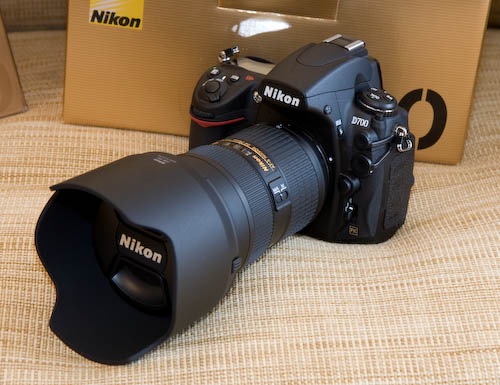
If anything, I’ve been pondering whether or not to sell my D700 while I can still get a decent resale price for it, and see what the long-rumored D800 brings. With the V1 filling in for the everyday camera, I would love to have my DSLR be a high-resolution monster. I guess I have to decide about that soon, but I’m still definitely committed to the F-mount for this generation of cameras.
Nikon SB-910 Quick Review
Ryan Brenizer has a succinct review of the new Nikon SB-910 Speedlight. It looks like a great speedlight, as expected, except for the new $100 added to the price. The best new “feature” of the SB-910, for me, is that it convinced a bunch of people to sell of their SB-900s to upgrade. My SB-900 has been great, so I picked up a second one in excellent condition on the used market for $300.
Kodak Files for Chapter 11
I mentioned earlier that Kodak was planning to file for Chapter 11 protection, and they’ve now done it. The Online Photographer has a good write-up and comments section discussing the company.
The camera pictured there, the Instamatic, was also my first camera; it was a hand-me-down/gift from my grandparents, and I loved it. It, along with a Polaroid they later gave me, certainly ignited my interest in photography. I was recently trying to describe to my wife, the nostalgic romance the black-and-white darkroom holds for me, even though the plain fact that I’ll never go back to it from digital printing. The thought of the smells of Kodak chemicals certainly trigger fond memories (a strange concept to someone who doesn’t know what I’m referring to, I know), and I’m sad that Kodak will clearly never again be the same. Hopefully they can find a way to restructure and reinvent themselves into something lasting and relevant again.
TV Shows Returning (and a little Doctor Who)
OK, OK, enough with the photography/camera posts for a minute. 😉
Some shows I particularly enjoy are coming back soon, so I thought I’d give them a shout.
Justified is back tonight on FX. The first season was fun, but far too cartoony. The second, however, was really good. It had better pacing, a wider cast of characters, and just a little more believability (I mean, Raylon can’t shoot people that often, can he?). But just a little; it still had plenty of action. Here’s hoping that season 3 is as good.
Another guilty pleasure, Cougar Town comes back on Valentine’s Day (evening, really). I really didn’t expect to like this show, given the original pitch, but it quickly turned into a comedy that Val and I enjoy watching. I’m glad it survived and that it’s back. I hope it keeps going and maybe finds a little more popularity.
Last, and certainly not least, the season 5 premiere of Mad Men will air on March 25th. I don’t need to say much here, I don’t think. I’ll be watching.
Tangentially related, I finally caught up on Doctor Who last night. I’ve still got the last episode rumbling around in my head, but I think I’m a little disappointed. I think the “big question” could be a fun thread to explore, but I felt a little cheated by “The Silence” and the resolution to the Doctor’s death. I’m not sure what I was expecting, but I think the resolution wasn’t clever enough, given the tremendous way the season started. That was quite a set-up to squander. That said, I think Matt Smith has really hit his stride with the character and made it his own. I wouldn’t mind seeing his split with Amy and Rory become permanent, though; it feels as if there’s not a lot new to mine there, and this is a natural breaking point.
Fuji X-Pro1 and Nikon 1 V1 Preview Links
I ended up at Vlad Dodan’s blog after following a link to his hands-on preview of the Fuji X-Pro1. Not many people have had a chance to shoot with one, so I found this of particular interest. It’s a good read, so you should check it out if you’re generally interested in the camera. If you’ve been reading me, you’ll know that I’m worried that the Fuji’s AF won’t be up to snuff. Here’s what Vlad had to say about it:
Auto-focus speed was decent. Not Nikon V1 fast but not too slow either. My biggest problem with the AF isn’t the speed though. It’s the fact that it hunts, and misses quite allot, if you’re looking through the viewfinder. If you’re using the back LCD it gets considerably better. (Still hunts but at least you can see if you have your subject in focus or not)
That sounds like the X100 to me, and it was a deal-breaker. There’s some really good stuff in there, too:
The viewfinder is the main character of the show and If you loved the one on the X100, the new (v.2) will bring you joy.
That’s great, since I thought the viewfinder was one of the best things about the X100, so I’m happy to read this. These days, I’ve pretty much decided that I’m not going to be in the market for the Fuji, though. Not because I bought the V1, but because the Fuji is too big. I think that for me to buy another system, it’s going to have to be either significantly smaller than my Nikon DSLR system, or significantly better. Sounds like the Fuji has a way to go on either score, but I’m super-happy to see that they’re trying, and I think they’ll have a lot of success going the route they’re headed.
I decided to poke around on Vlad’s blog a bit, since I’d never read it before. It turns out that he also did a preview of the Nikon 1 V1 that I find to be accurate and fair. I can’t tell from the post when it was published, but if it was near the launch, that’s a lot better than how most people were reacting to the Nikon 1 system at the time.
Nikon V1 with 50mm f/1.4

Speaking of useful F-mount lenses on the Nikon 1 V1, I spent some time this weekend playing around with the 50mm f/1.4 on the V1. With an angle-of-view equivalent to a 135mm lens in 35mm terms, the 50mm is a fun focal length. It’s a good portrait lens, especially with the shallow depth-of-field the fast lens affords. The overall physical package is appealing too: it’s certainly bigger than you’d generally want for a compact set-up, but is still small for the reach and speed the combo provides. The extra glass feels pretty well-balanced as a whole, and I really like the way it feels in the hand.

The lens is a sharp one on an FX camera, and it’s also very good on a CX-sensor camera. The corners, which can get soft at f/1.4 on an FX camera, are no issue at all on the 1-series. With the camera set to use its electronic shutter and the sounds off, the 50mm did well for candid portraits that fill the frame well from across a table. The complete package is small and unassuming, especially from that distance, and the lack of sound really kept attention off of me while I shot.

I considered having an existing investment in Nikon lenses a minor plus in the Nikon 1 format’s favor when considering whether or not to buy it, but the FT-1 is turning out to be a real boon for me. The V1 is a really fun camera to shoot with in any case, and the different personality of each lens that was already in my bag is proving to be more than just a nice side-benefit of the Nikon 1.
Poor Man’s 200mm f/2
Interesting quote from Thom Hogan regarding the newly announced Nikon 85mm f/1.8 lens:
That said, I’ll go out on a limb here: the 85mm f/1.8 G will be a huge seller. Not to D4 users. Not to D800 users. Not to D400 users. Not to existing Nikon DSLR users. Nope, it will turn out to be the lens of choice for Nikon 1 users. At 230mm equivalent, f/1.8, and relatively compact on a Nikon V1 body, it becomes the poor man’s 200mm f/2. What soccer mom/sports dad wouldn’t like one of those?
Great observation, although I’m not sure how many of the “target market” Nikon has in mind for the 1-series would think to buy the FT-1 adapter and an F-mount 85mm lens for that shooting situation. Most “consumer”-level people I know wouldn’t even consider a prime lens; they all view the practicality of zooms as important, and value wide focal ranges. Most don’t understand drastic the difference of a maximum aperture between f/1.8 and f/5.6.
If you think that soccer parents would be well-served by a “poor man’s 200 f/2″, just imagine how many basketball/volleyball/other indoor sports parents would. It would probably revolutionize photography for them. That said, $500 (lens) + $260 (FT-1) would be out of many budgets. Still, it’s a great thing to think about. And what a tiny package for such speed and reach!
The 85mm f/1.8 is a lens I’m going to keep a close eye on. I’ve longed for the 1.4, but can’t bring myself to spend that kind of dough right now. The 1.8 is something I’d definitely consider, if the results it gives look as good as I expect they will. Having it serve double-duty on the V1 would be icing on the cake, but very tasty icing indeed.
Interesting Photography Links
Fuji X-Pro1 AF Not Good?
It’s from someone-who-knows-someone, but Steve Huff has an interesting note on his blog about the upcoming X-Pro1′s autofocus:
The X-Pro 1..well, I think it will be fantastic but I did get an early e-mail report from someone who has been using one for a little while and it was not the greatest report. I will not post details here because I have no images and can not disclose who this is so it is really pointless. I heard things about the AF being slow, especially when light gets low, lenses being metal on the inside and plasticky on the outside, manual focus NOT good, not so hot battery life and the 2nd gen EVF being average.
I normally wouldn’t post a link to something like that, but Steve Huff’s site has been good and I’m inclined to believe that Fuji can’t have solved all of the issues with the X100′s autofocus this quickly. Hopefully Fuji keeps iterating and improving. There’s no doubt that they’re making some of the more interesting cameras out there right now.
Fuji X-Pro1 Lens and Accessories
Speaking of the X-Pro1 (what a terrible product name), TechRadar has the scoop on Fuji’s plans for lenses and accessories for the system. a 23mm f/2 sounds good (although faster is always better), while a 70-200mm f/4 sounds interesting and unexpected. Good stuff.
Nikon 1 V1 Underwater Housing
An expensive underwater housing for the Nikon 1 V1 isn’t something I’d invest in, but I think it’s awesome that such a thing is coming out for the V1 so quickly. Supports the Speedlight SB-N5 too…cool!
More on the Nikon 1 V1
According to my receipt, I’m coming up on owning the Nikon 1 V1 for one month, and according to my Lightroom catalog, I’m approaching 2000 images shot with it. I thought that made now as good a time as any to expand on my first impressions. (By the way, I’ve added this and other posts to the bottom of that original post, so if you’re interested in reading more, check that out.)

What’s Good?
The Autofocus
The autofocus continues to amaze me, and even though I praised it early on, I have to reiterate it here. I typically use only the center focus point, but allow face detection to override it. This makes shooting the kid easy-peasy. If she’s running around, I turn on focus tracking, which works better on this camera than many others I’ve played with that are much more expensive. I’m not exaggerating when I say that this camera’s AF system performs almost as well as the D700s, and that camera’s AF is excellent. It is slower in low-light, but it’s still good.
I was particularly impressed when mounting F-mount lenses on the Nikon 1: It focuses very well with them, except that it can’t do AF-C. I also played quite a bit with manually focusing F-mount lenses on the 1, and I’m pleased with how easy it is to focus with the EVF. Manually focusing in dim light is one time when an EVF is actually superior to an OVF, since the EVF is brightened for you. The EVF is sharp enough that I was able to keep critical focus on subjects moving moderately (i.e., not running).
Metering and File Headroom
I’ll combine these together since I mentioned that I thought the metering was great last post. To elaborate further, I find that the V1 does a very nice job in high-contrast situations, keeping highlights under control and getting a good-looking histogram from the camera is easy (if only I could see it live!). Furthermore, I’m impressed with the RAW files the V1 turns out; they have plenty of headroom in the highlights to recover any that do go over the edge. Post-processing Nikon 1 files has been a joy in Lightroom 3.6, and I’m expecting even more from the newly released Lightroom 4 beta.
Fit, Finish, and Feel
Some out there don’t like the feel or the form factor. I personally find the V1 to be an attractive, understated design. The size and weight are spot-on, and it doesn’t feel at all toy-like to me. It feels like a quality tool. The EVF really comes in to play here, because keeping the camera up to my face really adds to the “real camera” feel for me. Moving from my eye and away to review images and back is natural, and while I’d like the eye sensor to switch a little more quickly, I can’t really complain.
Speaking of the menus, I want to double down on my first impressions that the camera is fast from an operational point-of-view. You know that LCD menu feel? Where you’re scrolling among items, and the menu shows you what’s selected by reversing the text and its background color, but it’s just a bit slow and you can kind of see it drawing the screen while scrolling? The Nikon doesn’t feel that way at all; it’s fast and fluid, and never feels like it’s lagging behind your choices. It’s very nice.
It’s Quiet
Even using the mechanical shutter, this is a quiet camera. AF is silent, and the shutter is a slight “snick”. If you switch to the electronic shutter and turn off the sounds, it’s absolutely silent. It’s the quietest camera I’ve ever used in this mode. On top of that, it can be blazing fast in this mode, and your subject won’t even know you just shot them at 10 FPS! Wonderful.
What’s Not So Good?
There are some frustrating things about this camera, and it seems like Nikon can fix them with firmware updates. I’d say Nikon hasn’t been good with that in the past, so we’ll see if they’re going to try and iterate on the Nikon 1 line differently than they do their SLR line. None have been deal-breakers for me, but here are the headliners:
Auto ISO
Auto ISO has a few problems. First, it tends to pick too slow a shutter speed in favor of keeping ISO low. Subject blur is way worse in my book than noise is, and I really want to be able to specify more about how I want the camera to behave with regard to minimum shutter speed. Of course, I can go into shutter-priority mode, but I want Auto ISO to handle that with a few parameters I set and allow me to remain in other shooting modes, as the situation warrants on a creative basis.
Auto ISO also needs to show me in real-time what it’s set to. Right now, it shows its maximum possible ISO. For instance, if I’m using Auto 3200, meaning the camera can go as high as ISO 3200 if it needs to, it shows “3200” to me while shooting, even if it’s selected ISO 100 because I’m shooting in daylight. I want to know where it is in the situation I’m in. Lastly, I can set Auto ISO to several maximum levels, but it skips 1600, which is one I want to use fairly often, as it tends to be about where my tolerance is for noise in most situations. Grrr.
Image Review
I mentioned this before, but it bears repeating: you can’t turn off image review. I don’t always want to see what I just shot, especially when I want to keep shooting immediately. Simply half-pressing the shutter doesn’t get rid of the review, either; you have to wait it out. This one is particularly aggravating, but I find I’m getting more used to it. If I could prioritize changes for a firmware update, this would probably be number one.
Physical Controls
As most reviews have pointed out, the camera could really do with some more essential physical controls. The mode dial it does have is useless to me, and it does get knocked into other modes when pocketing or bagging the camera, which causes a couple of seconds of confusion every once in a while. It’s easy to get to exposure compensation, AF mode and a couple of others. But ISO should be a single button away, as should shooting mode (PASM). There are a couple of items that have physical shortcuts that should be swapped out in my mind with more important functions such as these (shutter type and self-timer, for instance).
I’m Keeping It
I bought and returned a Fuji X100 late last year, and bought the V1 not half expecting it to be another disappointment. I’ve been interested in replacing the Panasonic GF1 I’ve been using for the past couple of years, and I’ve now firmly decided that I’m keeping the V1. Since the original purchase, I’ve purchased most of the available major accessories for the camera, and think the system so far is a blast. The camera is fun, encourages playful shooting and really allows you to get into the moment, which has been a real problem with the other small cameras I’ve used. I’m delighted to say that I’m really enjoying the V1 far more than I expected to.
My Reaction To Trey Ratcliff’s “DSLRs Are A Dying Breed”
If you haven’t read Trey Ratcliff’s post, “DSLRs Are A Dying Breed—3rd Gen Cameras Are The Future”, you should either do so now or skip this post. I’ve had several friends and colleagues ask for my reaction to Trey’s post, since I’m the local photography nerd they know, so I thought I’d write down my thoughts and point people here.
The short version of my response is that Trey isn’t really saying anything surprising or new, as far as I can tell. There’s plenty to take issue with if you get into the details of the post, but the idea that cameras are getting better, smaller and faster than previous models and designs is completely obvious to anyone who’s paid even moderate attention to the field. Perhaps unsurprisingly then, my reaction consists of points that are also not new. (Main points in bold below for the tl;dr crowd.)
Whither DSLRs?
I think that a lot of the internet has gotten wrapped up in the specific statement that DSLRs are dying. First off, this is a classic attention-getter. I mean how many “xxx is dead” posts are we going to react to in this way before we learn? I suppose the answer is, “a lot more”, since they always seem to work people up.
There’s nothing magic about the form factor or technology of DSLRs in particular. Whether you focus on the mirror that reflects the view of the subject through a finder or CMOS/CCD as sensing technology, or any of a hundred other current solutions to capturing images, it’s all up for grabs in the near future. Take not only the current trend of small, mirrorless cameras, but also things on the cutting edge like the Lytro. Cameras as a whole are evolving faster now than they have in the previous few decades combined, and nothing is sacred in the medium term.
DSLRs are the evolution of SLRs from the film days. Film photographers yearned for digital cameras that worked and behaved like what they were used to, and as the incumbent market for high-end cameras, that’s what the manufacturers made. We’ve seen this form factor stretched to, and beyond, its limits in recent years. You only have to look at the crazy rigs people are coming up with to shoot pro-level video with DSLRs to realize this.
Trey’s post and the video embedded therein make the point that the industry has been moving towards solid-state image capture for a long time, and there’s no reason to argue this point. Mechanical shutter wear has long been one differentiator between a consumer- and a pro-level camera. Fewer moving parts means, at a minimum, higher reliability (user serviceability be damned).
So What’s The Fuss?
Well, like I said, the internet loves a good “xxx is dead” post. And Trey did say some things that it’s easy to get stuck on. Characterizing the current crop of mirrorless cameras as “3rd gen” cameras is a good example. There are many ways to characterize “generations” of cameras, and “3rd” doesn’t seem to be a particularly good or descriptive one to me. I don’t have a better one, but I also don’t think one is needed unless you’re looking for an argument. I mean, just look at everyone trying to find a broad yet descriptive way to talk about cameras like the Nikon 1 or Micro Four-Thirds formats: EVIL, ILC, MILC, etc. None are particularly good, but they’re what we have so far.
The other point, perhaps one of the main points of the post, is that Trey isn’t going to invest in DSLRs or related equipment anymore, and goes far enough to suggest that the reader might be smart to stop the same. I think that really depends on who you are, of course. If you’ve got a large investment in expensive, high-quality Nikon or Canon or whatever glass that mounts on an SLR, should you not get a Nikon D4 if your work justifies the cost simply because there’s a new class of camera in town? Of course not.
Trey follows up his post with reactions and this point: “If you (gentle reader) agree that you won’t be using a mechanical mirror-flipping device in the future, then we are in agreement. We may disagree on the rate-of-death – but that is all.” There we are. I agree that technology is moving forward quickly, but disagree, as he suggests anyone might, with the notion that DSLRs will be dead, or even largely dead, in five years, but time will obviously tell.
Cameras today are more like computers, and our consumption of them has changed to more closely resemble how we buy computers. No longer does someone buy a digital camera and really expect to be using it for more than a handful of years, at most. Compare that to classic film cameras, which are in some cases, still highly-sought after 50 years after they were new. One rule I follow when someone asks me about whether they should buy a new computer, whatever model it might be, or wait for the next great thing that’s surely around the corner, is to tell them that they’re better off buying what they need now. It’s just too hard to predict what will or won’t happen, so plan for now. I think cameras have been heading that way for awhile, and barring a photography show like Photokina being around the corner, I give mostly the same advice for people asking my opinion about purchasing one versus waiting. Buy what you need now, and start making images.
Would I suggest someone new to the field invest in a DSLR? I’d have to drill down further. Are they serious about photography? Do they have the budget/stomach for things to change drastically in the next 5-10 years? What kind of shooting are they looking to do. In my opinion, there are plenty of combinations of questions and answers that still lead to a “yes, you should invest in a DSLR-based system” for now.
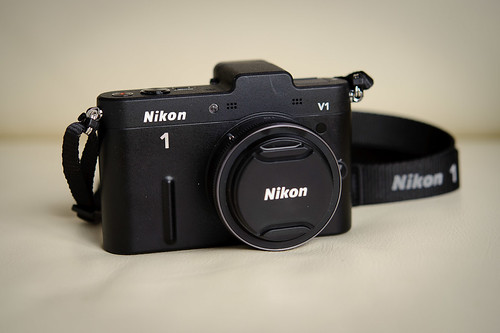
As I’m sure anyone who knows me already knows, I shoot with a DSLR, but have been a big fan of compact cameras for some time, having owned several Canon G-series cameras, Micro Four-Thirds cameras, and most recently the Nikon V1. I think that there’s room for both in the bags of any photographer who wants to always have a camera on him, but also wants the best tool for the job.
That’s what this comes down to, as many debates in photography around format or brand do: Cameras are tools. Pick the ones that do the job you need done best. If that’s a DSLR, I think they’ll still be around for quite some time. And even if they aren’t, the image they create is what matters, and as long as your new Nikon D4 is making the images you want, more power to you.
Lightroom 4 Beta Released!
Woohoo! It’s still downloading, but I’m looking forward to getting my hands on the new Lightroom 4 beta. We finally get soft-proofing! There are other things that sounds great, like “location-based organization” for cameras with GPS capabilities. Like my Nikon V1 with the GP-N100, perhaps? 🙂
Fuji X-Pro1 Pics
The Verge has some nice pics of the new Fuji X-Pro1 camera I mentioned in my last post. That camera looks sweet. The picture of the back has me worried though; that “Macro” button on the dial makes me think that it’ll have a special mode for close-focused pictures like the X100 does. “Macro” evokes visions of shooting small things close-up, whereas the X100 needed to be in that mode frequently, even when shooting everyday family pictures. I hope they’ve fixed that.